Quick answer: The Ethnic MCP Connector is a Magento 2 extension built on the Model Context Protocol (MCP), an open standard that lets AI assistants like ChatGPT and Claude securely read your store data orders, products, customers, inventory, coupons and answer questions in plain English. You install the module, create an ACL role that limits what the AI can see, generate an OAuth token, and connect it to Claude Desktop or ChatGPT. No custom reports, no spreadsheet exports, no waiting on a developer for a one-off query.
Model Context Protocol, in case the term is new to you, is the connective layer Anthropic introduced in late 2024 so AI models could talk to outside tools and data sources without a bespoke integration for every single one. It's not a niche experiment anymore it's infrastructure.
What Is the Ethnic MCP Connector?
The Ethnic MCP Connector is a Magento 2 extension that implements Model Context Protocol Magento integration at the platform level. Instead of exporting spreadsheets or asking a developer to build a custom API endpoint every time someone needs a number, the connector exposes your store's data through a standardized, permissioned interface that AI assistants already know how to speak.
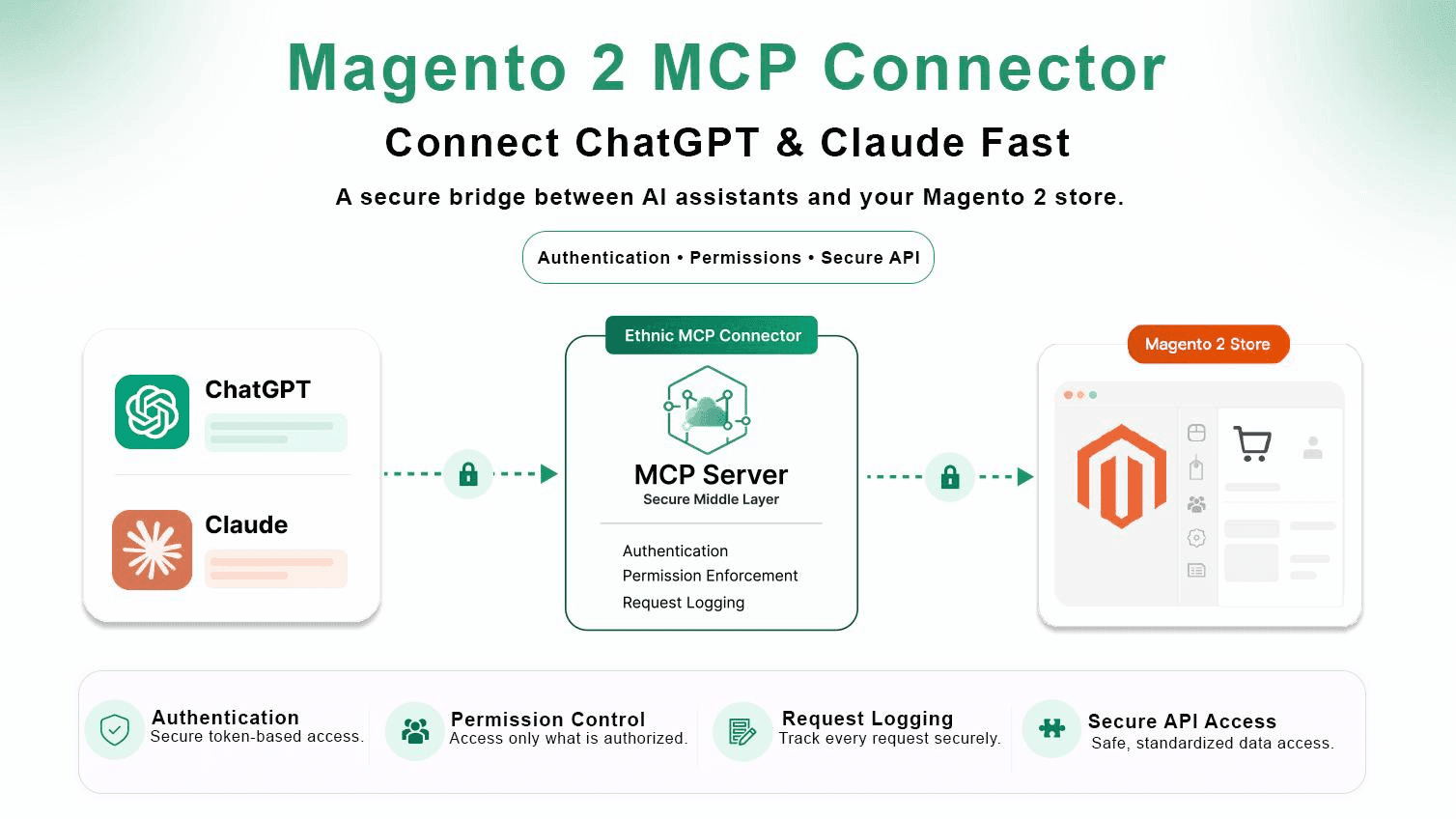
The architecture is simple on purpose:
AI Assistant → MCP Server → Magento Store
That middle layer matters. It's where authentication happens, where permissions get enforced, and where every request gets logged. The AI never touches your database directly it asks the MCP server, and the server decides what it's allowed to hand back.
Why Connect AI to Your Magento Store
Magento stores sit on a mountain of data orders, quotes, credit memos, catalog pricing, tax rules, admin users, system health and most of it never gets looked at because pulling it out takes too long. That's the real cost of a good platform with a clunky reporting layer.
This is exactly where AI assistant Magento integration earns its keep. Ask "which products are running low on stock" or "show customers who haven't purchased in 90 days," and the assistant converts that into an optimized query against your live store, no report-builder required.
The timing isn't a coincidence either. According to Shopify's 2026 AI statistics report, 84% of ecommerce businesses now rank AI as their top strategic priority, and 78% of organizations already use AI in at least one core business function. The gap isn't whether merchants want this it's whether their platform can support it safely.
Key Features That Actually Matter
Secure AI Integration
Every AI client authenticates through OAuth before it sees a single row of data. No shared logins, no copy-pasted API keys sitting in a Slack channel.
Role-Based Access Control (ACL)
Not every AI assistant should see everything. You can scope one client to orders only, another to inventory, another to customer records and lock the rest down entirely. This is the difference between a useful integration and a liability.
Powerful Magento Data Access
The MCP connector exposes multiple Magento resources through intelligent tools. These include:
Sales
- Orders
- Order Items
- Quotes
- Quote Items
- Credit Memos
Catalog
- Products
- Categories
- Inventory
- Product Prices
- Tier Pricing
- Tax Rules
Customers
- Customer Accounts
Marketing
- Cart Price Rules
- Coupons
Administration
- Admin Users
- Locked Admin Accounts
System
- Magento Version
- PHP Version
- MySQL
- Redis
- OpenSearch
- Store Hierarchy
This makes virtually every important aspect of your Magento store available to AI, all through the same permissioned MCP connector layer.
Natural Language Reporting
"What's my average order value this month" or "list products with inventory below 10" gets answered in seconds, in plain English, without touching the admin grid.
Magento AI Analytics Without a BI Stack
This is the part clients notice fastest. Traditional business intelligence work needs SQL skill, dashboard building, and manual exports. With Magento AI analytics running through the connector, the assistant does customer intelligence, churn detection, and sales trend analysis conversationally and explains why a number matters, not just what it is.
Flexible Filtering & Aggregation
Equals, not-equals, greater/less than, LIKE, IN-list, and date filtering are all supported through the MCP connector, alongside count, sum, average, min, and max grouped by month, day, customer, order status, payment method, or store. That's enough range to answer almost anything a merchant would ask on a Monday morning.
Every one of these filters runs through the same permission layer described above, so a scoped MCP connector client can aggregate freely within its allowed data without ever touching tables it wasn't granted.
Building This for Real Magento Stores
I've spent years shipping Magento 2 upgrades for stores that outgrew their original build Bedstar's catalog work and the Blue Lagoon migration are two we've talked about publicly. What kept coming up in those projects wasn't a platform limitation. It was that store owners and their marketing managers couldn't get a straight answer out of their own data without pinging a developer.
What didn't work: giving clients raw admin access to "just check it themselves." Most non-technical stakeholders don't know which grid to open, and giving broader access than needed is its own security risk.
What changed things: building the Ethnic MCP Connector as an actual Magento 2 extension rather than a one-off script for a single client. Once the ACL and OAuth layer were solid, rolling this MCP connector out to a new store took hours, not weeks.
The actual result, and I'll be honest about the limit here this isn't a replacement for a real BI platform if you need audited financial reporting or complex multi-year forecasting. It's built for the day-to-day operational questions that used to eat an hour of someone's morning. That's the gap it closes, and it closes it well.
MCP Connector vs. Traditional Reporting
| Approach | Setup Time | Non-Technical Friendly | Real-Time Data | Ongoing Cost |
|---|---|---|---|---|
| Manual admin reports | None | No | Yes | Staff hours |
| Custom BI dashboard | Weeks | Partial | Depends on refresh | High (licensing + maintenance) |
| Spreadsheet exports | Minutes per pull | Yes | No (stale on export) | Staff hours |
| Magento 2 MCP connector | Hours | Yes | Yes | Low (one-time setup + hosting) |
Compatible AI Platforms
The Ethnic MCP Connector integrates with the AI platforms teams are already using day to day:
- ChatGPT
- Claude Desktop
- Claude Code
- Other MCP-compatible AI clients
Once connected, whichever assistant your team prefers becomes a working Magento business analyst no separate tool to learn.
Enterprise-Grade Security
Security sits at every layer of the connector, not bolted on afterward. That means:
- OAuth Authentication
- Access Tokens
- HTTPS Communication
- Role-Based Permissions
- Separate AI Clients
- Token Rotation
- Permission Auditing
Together, these keep sensitive store data protected while still giving each AI client exactly the access it needs no more, no less.
Installation: What It Actually Takes
Both Composer and manual installation are supported. Once the module's enabled, the setup is short:
- Create an ACL role scoped to what the AI client should see.
- Create an AI client record inside Magento.
- Generate an OAuth token for that client.
- Connect ChatGPT to Magento, or point Claude Desktop / Claude Code at the same endpoint.
- Start asking questions.
Most MCP connector installs are done well within a single working session the ACL step is where it's worth spending the extra ten minutes, because that's your actual security boundary. Skipping it doesn't break anything on day one, but it's the difference between a well-scoped MCP connector setup and one that quietly over-shares data six months later.
Real Business Use Cases
- Magento store owners who want a daily sales pulse without opening five reports.
- eCommerce and marketing managers checking campaign-driven order lift in real time.
- Customer support leads pulling "customers who haven't ordered in 90 days" for a win-back campaign.
- Inventory managers catching low-stock SKUs before they go out of stock, not after.
- Agencies managing multiple Magento stores, where one MCP connector client per store keeps reporting consistent across accounts.
A well-configured MCP connector setup tends to pay for itself within the first few weeks, mostly in developer hours no longer spent building one-off reports.
This pairs naturally with the modernization work we cover in our guide to migrating from Magento 1 to Magento 2 a fresh Magento 2 build is the cleanest place to add MCP from day one. If your storefront is already on Hyvä, the connector runs independently of your frontend theme, so there's no rework needed there.
For a broader look at where AI is heading across the platform, our piece on how AI is transforming ecommerce for modern businesses covers the trend beyond just reporting. And if conversational AI is on your roadmap for customer-facing support too, our AI chatbot development team builds that layer on top of the same data foundation.
Anthropic's own December 2025 ecosystem update reported more than 10,000 active public MCP servers and over 97 million monthly SDK downloads a sign this protocol has moved well past the experimental stage and into infrastructure most serious platforms are expected to support.
Benefits for Your Business
Connecting AI directly to Magento through the MCP connector adds up to real, measurable gains:
- Save hours of manual reporting.
- Make faster business decisions.
- Improve customer retention.
- Optimize inventory levels.
- Increase sales through AI-generated recommendations.
- Monitor store health in real time.
- Access critical insights using simple conversational language.
The result is a more intelligent, data-driven Magento store one where the answer is a question away instead of a ticket in someone's queue.
FAQ
What is a Magento 2 MCP connector?
It's a Magento 2 extension that implements Model Context Protocol, letting AI assistants like ChatGPT and Claude securely query your store's orders, products, customers, and inventory in plain language instead of through manual reports.
How do I connect ChatGPT to my Magento 2 store?
Install the connector module, create a scoped ACL role, generate an OAuth token for an AI client, then add that connection inside ChatGPT's settings. The AI can start answering store questions within the same session.
Is the Ethnic MCP Connector secure enough for a production store?
Yes, when set up correctly. OAuth authentication, HTTPS-only communication, and role-based ACL scoping mean each AI client only sees what it's explicitly granted nothing more.
Can Claude actually see my real sales and inventory numbers?
Yes, through the same MCP server layer as ChatGPT. Claude Desktop and Claude Code both support MCP connections, so once the connector is configured, Claude can query live order and stock data.
The Bottom Line
Magento's data was never the problem access to it was. A Magento 2 MCP connector closes that gap by letting the AI assistants your team already uses ask the store directly, with permissions that keep the answer honest and the access controlled. It won't replace a dedicated BI platform for audited financial reporting, but for the questions that come up every day, it turns a five-tab admin hunt into a single sentence.
Ready to connect AI to your Magento store the right way?
Ready to connect AI to your Magento store the right way?Talk to our team about setting up the Ethnic MCP Connector, or explore our full Magento development services if you're planning a broader platform upgrade first.